
Quick Answer
Contractor invoicing and tax tools help field service businesses create invoices, collect payments, track sales tax, connect payment records to bank activity, and export reports for bookkeeping or tax filing. DuroWork brings those steps into the same job workflow contractors already use in the field.
One Place to Handle Invoices, Payments, and Taxes
DuroWork gives small contractors and home service businesses a simple way to handle invoicing, payments, and tax records in one platform. Instead of juggling spreadsheets, paper invoices, and a separate payment app, you can send professional invoices, collect payments, and track sales tax from a single screen.
Whether you run an HVAC company, plumbing crew, electrical shop, or any other field service business, DuroWork helps you get paid faster while keeping your books clean and tax-ready.

Core Invoicing & Tax Features Built for Contractors
Instead of generic accounting software designed for everyone, DuroWork focuses on what matters most to contractors working in the field.
- Instant Invoices: Create and send branded invoices from your phone, tablet, or office computer in minutes.
- Sales Tax Tracking: Apply the correct tax rate to line items, track taxable vs. non-taxable services, and keep a clear record of tax collected.
- Stripe Payment Integration: Take card payments on site or via email link and see payments tied directly to invoices.
- Tax-Ready Reports: Export clean, organized reports for your accountant at quarter-end and year-end.
- Customer & Job History: See every invoice, payment, and balance by customer or job.
- Bank Statement Tracking: Match Stripe deposits and bank activity to invoices so nothing gets lost.
- Mobile-First Design: Built for technicians in the field who need to invoice and collect payments on the go.
From Finished Job to Paid, Tax-Ready Invoice
Here is how the DuroWork invoicing and tax workflow looks in a typical day for an HVAC or service contractor.
1. Build the Invoice in Seconds
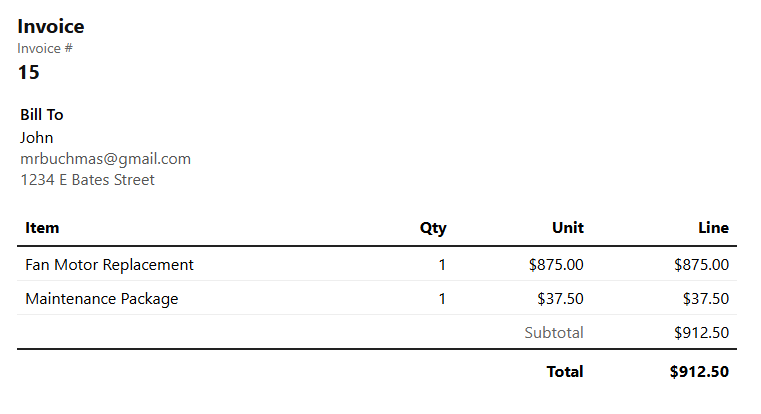
After a job is complete, your tech selects the customer, chooses services from your pre-built list, adds any materials, and taps “Create Invoice.” Labor, materials, and trip charges are already priced correctly, so there is no math on site.
2. Apply the Correct Sales Tax
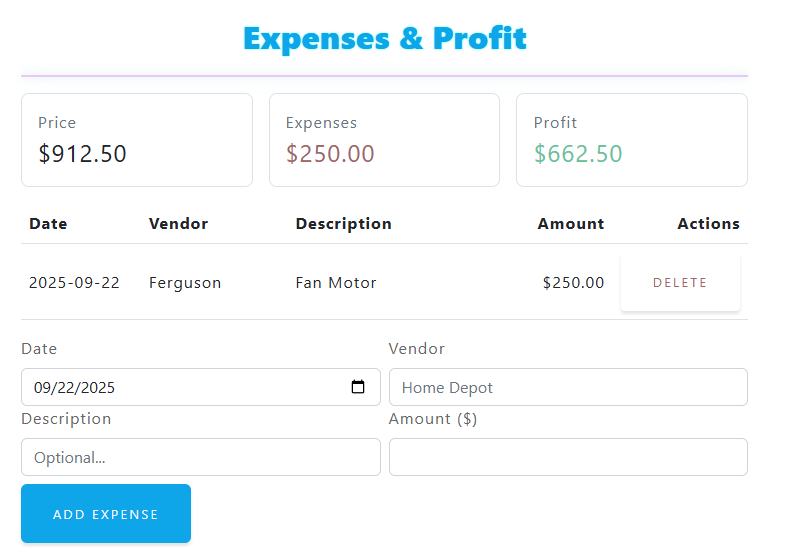
Select the proper tax rate for the job location and mark which line items are taxable. DuroWork calculates tax automatically and stores those totals so you can easily see how much tax you have collected for your next filing period.
3. Send the Invoice and Collect Payment
Send a digital invoice by email or text, or accept a card payment on site through Stripe. The customer can pay on their phone while your tech is still there. Once payment is complete, DuroWork marks the invoice as paid and records the transaction details.
4. Reconcile Deposits with Bank Statement Tracking
As Stripe deposits hit your bank account, you can use DuroWork’s bank statement tracking to match deposits to the invoices they came from. This keeps your books clean and reduces time spent hunting down discrepancies.
5. Export Tax-Ready Reports
When it is time to file sales tax or hand information to your accountant, export reports showing revenue, tax collected, and open invoices. Instead of piecing this together from different tools, everything is already in one place.
Why Tax-Aware Invoicing Matters
Many contractors treat invoicing and taxes as separate tasks. The tech sends an invoice, someone in the office records the payment, and later a bookkeeper tries to piece everything together for tax time. That is where mistakes happen.
- Reduce the risk of under-reporting sales tax.
- Keep a clear audit trail of invoices, payments, and tax collected.
- Save hours each month preparing reports for your accountant or CPA.
- Spot late or unpaid invoices before they become bad debt.
Stripe Payments That Flow Straight into Your Books
Collecting payment is easier when it is baked into your invoicing flow. DuroWork uses Stripe to process payments securely, while DuroWork keeps the records organized for your business.
- On-Site Card Payments: Let customers pay immediately while the tech is still at the job.
- Payment Links via Email or Text: Send a link and let the customer pay from their phone or computer.
- Automatic Payment Status: Invoices are marked as paid as soon as Stripe confirms the transaction.
- Deposit Matching: Use bank statement tracking to connect Stripe deposits to specific invoices.
Sales Tax Tracking Without the Spreadsheet
Instead of calculating sales tax in a spreadsheet or hoping your accounting software lines up with what actually happened in the field, DuroWork keeps everything tied to the original invoice.
- Set up commonly used tax rates by region or city.
- Mark which services or materials should be taxed.
- See total tax collected for any date range with a few clicks.
- Export summaries to share with your accountant or bookkeeper.
Reports Your Accountant Will Actually Like
At quarter-end or year-end, your accountant wants organized data. DuroWork gives you revenue reports, sales tax totals, open invoices, aged receivables, and exportable CSV or PDF reports you can email directly to your CPA.
Designed for HVAC and Home Service Contractors
While DuroWork can serve many types of field businesses, it is especially helpful for trades like HVAC, plumbing, electrical, and other home services. These businesses do work on site, need to invoice immediately, collect sales tax, and need clean records without making techs act like bookkeepers.
DuroWork keeps the experience simple for techs while maintaining the detailed records you need behind the scenes. For HVAC companies coordinating several technicians or install crews, the same connected workflow works even better when paired with multiple crew calendar scheduling.
Best Practices for Getting Started with DuroWork Invoicing
- Enter or import your existing customer list.
- Set up your most common services with standard pricing.
- Configure your local sales tax rates and mark taxable items.
- Connect Stripe and run a small test payment.
- Train your techs to create invoices and accept payments on site.
- Schedule a weekly time to review unpaid invoices and run tax reports.
Make Tax Season Less Stressful
Tax season is usually stressful because information is scattered. With DuroWork, invoices, payments, and sales tax totals are all in the same place. That means fewer surprises, fewer late nights with spreadsheets, and more confidence that your numbers are right.
Next Steps: See DuroWork’s Tax & Invoicing Tools in Action
If you are ready to simplify invoicing and get more organized for tax time, start by running a few real jobs through DuroWork. Create an invoice, collect payment with Stripe, and export a report. You will see quickly how much easier it is to track what you have billed, what has been paid, and how much tax you have collected.
DuroWork is built to grow with your business, whether you are a solo tech or managing multiple crews. Clean invoices and accurate tax records are the foundation of a healthy contracting business, and DuroWork helps you manage both without extra headaches.